


Cloud Data is Becoming the Standard
More and more companies are storing at least part of their data in the cloud. Often, they are not even fully aware of it. Modern work tools frequently utilize cloud infrastructure, and users simply use it as another IT service.
The cloud environment is one of the greatest conveniences of modern IT infrastructure. In many cases, it is a more convenient, scalable, and secure solution than storing data on one's own servers. There are many scenarios where the cloud performs very well.
However, this article will focus on the threats associated with storing data in the cloud. Not to discourage the use of these solutions, but to show what risks are worth considering.
Private Cloud and Public Cloud
In simplified terms, there are two most commonly encountered models of cloud environments.
A private cloud is an environment created by an organization for its own needs. The company designs its architecture, controls the way data is secured, and has full knowledge of where the data is stored and how it is protected.
However, the vast majority of companies use the public cloud. It is provided by specialized service providers. In this model, the company uses ready-made infrastructure, but often does not consider how it is built and what risks may be associated with it.
What Cloud Means in Practice
For many users, the cloud is not an abstract technological concept. It is specific services that they use every day.
These are most often:
file storage places such as OneDrive, Dropbox, or Google Drive
email servers such as Exchange Online, Gmail, or commercial hosting services
collaborative workspaces such as SharePoint, Google Workspace, or Dropbox Business
For the user, these are simply work tools. In reality, this means that the company's data is on external service providers' servers.
Two Main Threats
In the case of data stored in the cloud, two main types of risk can be identified:
data disclosure
data loss
Data Disclosure or Compromise
Unauthorized persons may gain access to data stored in the cloud.
This most often happens as a result of several typical situations.
It could be a user error. An employee shares a document publicly or sends access to the wrong person.
It could also be an account takeover by a third party. Phishing attacks often involve stealing login information for cloud services.
One cannot rule out an error on the part of the service provider. Large organizations also employ people, and every IT system may contain flaws.
History shows that even the largest cloud platforms can experience security incidents.
Examples of such incidents include:
Capital One in 2019. A data leak of 106 million customers related to a misconfiguration of the Amazon S3 cloud environment.
Twitch in 2021. A leak of about 125 GB of data including the platform's source code and financial information of streamers.
Microsoft Azure in 2022. Disclosure of about 2.4 TB of data concerning more than 65 thousand organizations due to a misconfiguration of services.
The purpose of citing these examples is not to scare users, but to show that even the largest technology companies are not completely free from problems.
Therefore, it is worthwhile to consciously decide what data we store in the cloud and which data is better kept in our own infrastructure.
Data Loss in the Cloud
The second significant threat is data loss.
The simplest scenario is accidental or deliberate deletion of data by the user. Sometimes such an event is only noticed after a long time, when recovery of the files is no longer possible.
Another problem may be malware that encrypts data synchronized with the cloud service. In this case, the encrypted files also go to the cloud.
The rarest, but most unpredictable scenario is a failure on the part of the service provider. This may mean temporary unavailability of the system or loss of some data.
Large technology companies have sophisticated security systems and redundancy mechanisms. Nevertheless, no provider can give an absolute guarantee of data availability.
Shared Responsibility Model
Using cloud services is based on a shared responsibility model.
The cloud provider is responsible for the technical infrastructure. This includes servers, networks, data centers, and physical security of systems.
The user, on the other hand, is responsible for the security of their own data, access configuration, and how they use the services.
In practice, this means that even if the provider's infrastructure is very well secured, incorrect configuration of accounts, lack of access control, or lack of backups can still lead to data loss or disclosure.
Therefore, data security in the cloud requires active action on the part of the organization using the services.
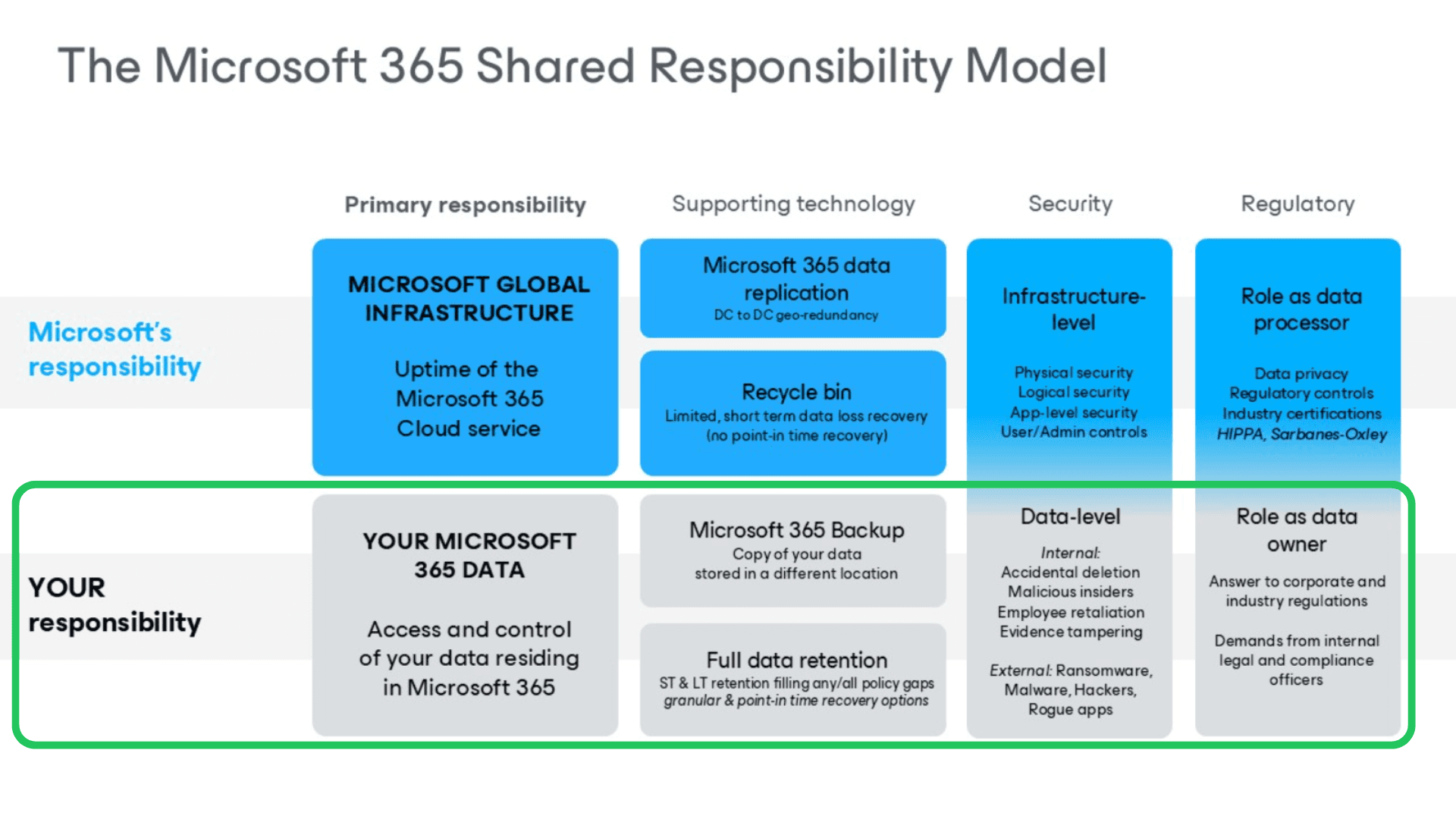
Shared Responsibility Model Illustrated by Microsoft 365
Source: https://www.veeam.com/blog/office365-shared-responsibility-model.html
The Most Common Mistake Companies Make When Using the Cloud
The most common mistake is the belief that since data is in the cloud, it is automatically secured against loss.
In reality, most cloud services are not backup systems but tools for storing and synchronizing data.
If a file is deleted or encrypted by malware, this change may be immediately synchronized to the cloud as well.
Backup of Cloud Data
The most important rule of security is that data stored in the cloud should also be backed up.
More and more organizations consider backing up data from cloud services as a standard security practice. The lack of such a backup is beginning to be seen as a serious oversight.
There are various models for backing up data from the cloud.
One of them is copying data from one cloud to another. This allows data to be stored in two independent environments.
The second approach is copying data from the cloud to the organization's own infrastructure. This solution combines the convenience of working in the cloud with having a backup copy fully under the organization's control.
In practice, this comes down to a simple principle. Data in the cloud is convenient and often very secure, but it still remains data over which we do not have full control. Therefore, a reasonable security strategy assumes having a backup in another location.
Cloud Data Backup in Your Company
If you use services like Microsoft 365, Google Workspace, Dropbox, or other cloud platforms, it is worth checking whether your data is covered by an independent backup.
More and more companies are choosing to back up cloud data to a second environment or to their own infrastructure to mitigate the risk of information loss.
If you want to find out which solution will be right for your organization, the Helpwise team can assist in designing and implementing a secure backup of cloud service data. We implement solutions from trusted providers such as AvePoint or Veeam, tailoring the technology to the specifics of the environment and the client's needs.